
Stories
Instagram Story Viewers Order Explained (2026 Guide)
Learn how Instagram story viewers order works, what the ranking does and doesn't mean, common myths about top viewers, and what public tools can verify.
Oct 19, 2026
Save your own Instagram Story to your camera roll or archive, or save a public Story without logging in. Exact steps, quality limits and privacy rules.
You've just posted a Story, then realized you need the clip later. Or you've found someone else's public Story that you want to reference, only to discover that Instagram has already removed it from the normal Story surface. The right Instagram Story save method depends on what you're trying to preserve, and choosing the wrong one creates most of the frustration.
Instagram Stories launched in August 2016 as temporary content that disappears after 24 hours, unless the creator saves it to an archive or adds it to a Highlight. Instagram Stories remain one of the platform's largest daily surfaces, but temporary content requires a decision before it expires.
Quick answer: To save your own Story, open it, tap Options in the bottom right, tap Save…, then choose Save photo/video (the current item) or Save story (the whole Story as one video). To save someone else's public Story without logging in, enter their username in the free Instagram Story viewer, select Look up, then Save photo or Save video within 10 minutes. Private and Close Friends Stories can't be saved this way.
Most searches for an Instagram Story save fall into three different jobs. They sound similar, but they need different methods.
Keep for later means you want to replay or reference your own Story inside Instagram. The native Story Archive is the right choice. It keeps saved Stories private to the account owner and lets you revisit them in the app.
Back up locally means you want a copy on your phone, computer, or cloud storage that remains available outside Instagram. Use Instagram's camera-roll save option for your own content, ideally while the Story is still live. This gives you ownership of a local media file rather than relying only on an in-app archive.
Publish publicly means you want to reuse, share, or study another account's Story outside the original viewing experience. That's where a third-party downloader may fit, but only for content from a public account and only when you have the right to reuse it.
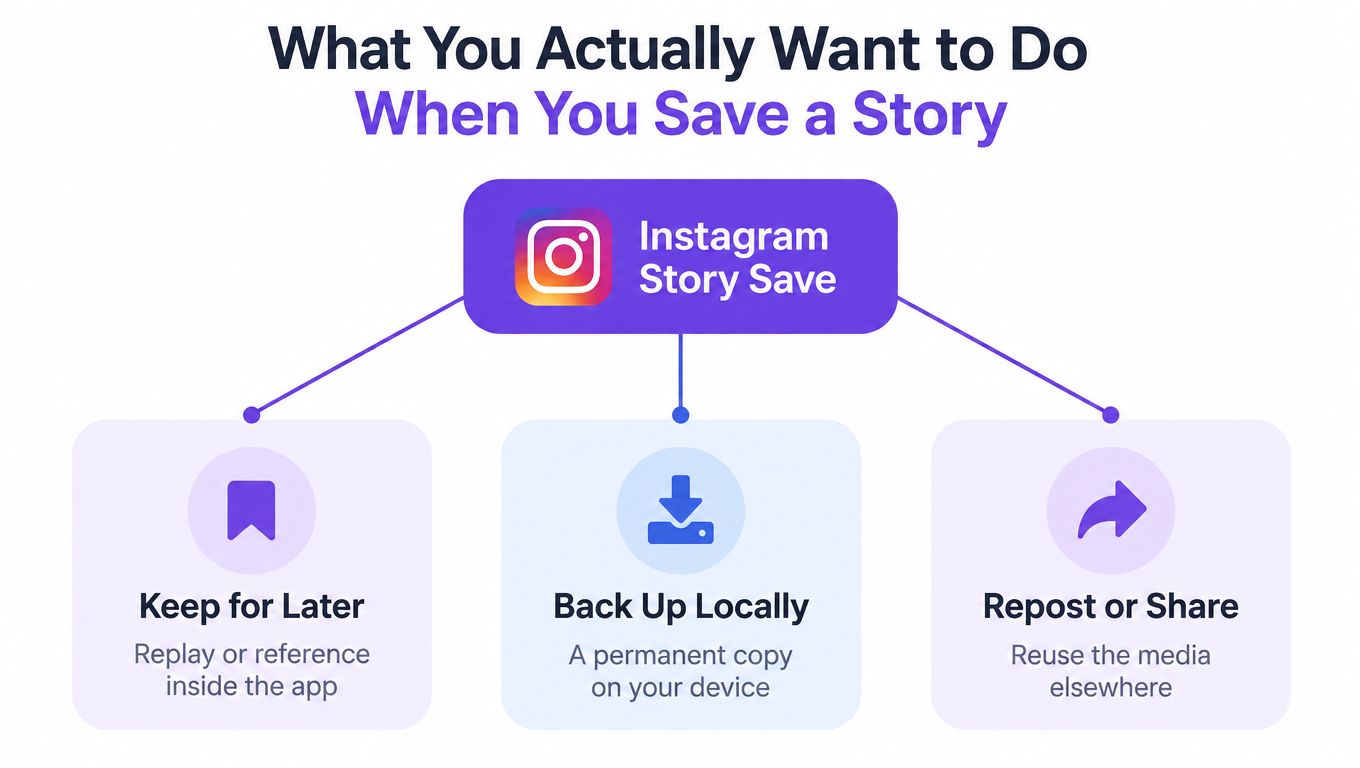
Decision rule: Identify the job first, then choose the save method. Don't start with a downloader and hope it solves the wrong problem.
The mismatch is easy to spot. Someone who wants a private backup may add a Story to Highlights, making it visible to the profile’s permitted audience instead. Someone who wants an offline file may trust the archive, then discover the content still lives only inside Instagram. Someone trying to save another account's content may wait until the Story expires and blame the tool for an unavailable file.
Stories are available only during their live window on the normal Story surface. Academic research also notes that Instagram's APIs don't offer a straightforward way to retrieve Stories directly, which explains why external saving workflows need to capture public media before expiry. Research on Instagram Stories and their technical limitations supports the practical conclusion: if the Story matters, save it while it's live.
If you created the Story, Instagram's built-in tools should be your first choice. They avoid third-party access and preserve the cleanest connection between your account and your own content.
Open your Instagram profile, open the menu, and find the Archive or Story Archive settings. Make sure Story archiving is enabled. Once enabled, Stories move into the private archive after they leave the public Story surface, allowing you to revisit older posts from the account that created them.
The archive is not a public folder. Other people can't browse it, and adding a Story to the archive doesn't publish it again. That makes it the cleanest option for the keep-for-later intent, especially when you want to review past updates, recover an idea, or find a clip without storing every file manually.
Archive isn't the same as a local backup. It depends on access to the account and Instagram's own storage, so creators who need independent ownership should also save important originals to a device or cloud folder.
Instagram's camera-roll help page gives the current path: open your Story, tap Options in the bottom right of the item, tap Save…, then choose Save photo/video to save that item or Save story to save everything in your Story as a single video. You can also tap Save at the top of the screen before you share. The option is in the Android and iPhone apps, not on a computer.
The destination differs by platform. iPhone generally routes saved media through Photos, while Android typically places it in device storage or the gallery. Check the destination immediately after saving instead of assuming the file went to the folder you use for camera uploads.
Highlights appear on a profile and let the permitted audience watch selected Stories after the normal Story period ends. A Highlight does not make a private account public. They're useful for FAQs, product information, portfolios, and introductions, but they're not a private archive or an off-platform backup.
Use the methods this way:
That distinction prevents the most common native-saving mistake, treating a public Highlight as though it were a private copy.
A browser downloader makes sense only when the goal is to save or reference media from a public Instagram account. It isn't a replacement for the archive and it can't legitimately access private Stories.
To save available public Story media, open the Stories media tool, where the Stories function is already selected. Enter a public Instagram username, a profile link, or the full Story URL, then click Look up.
The username shortcut is usually fastest. You don't need to copy an individual Story link for every item. Enter the username, review the active Story cards, open the item you want, and preview the returned media before saving it.
Choose Save photo for an image or Save video for a video. The tool returns the media format supplied by the source. It doesn't provide a format or resolution selector, and it shouldn't be treated as an enhancement tool. The available quality depends on the source file Instagram makes available.
The biggest operational mistake is waiting after the lookup. Save links expire after 10 minutes, so preview the correct item and download it immediately. If the link has expired, run the lookup again rather than repeatedly refreshing an old download page. The Stories downloader is intended for available public content, not private, deleted, or expired Stories.
For several Stories, open each Story card and save the files during the same session. Don't assume a result will remain available after you've left the page. A short naming system, such as the account name followed by the date and Story subject, also makes later reference much easier.
Browser-based tools can still see technical signals, such as your IP address and device details, even when they don't ask for an Instagram login.
Use this route only for the publish-publicly intent, and separate saving from republishing. A public Story may be technically downloadable, but that doesn't automatically give you permission to post it on your own account, use it in advertising, or present it as your work.
A downloader should give you a usable copy of the media Instagram returns. It shouldn't promise to restore quality that Instagram no longer provides.
For practical purposes, MP4 is the standard format for video Stories and JPEG is the standard format for photo Stories. Keep the returned format and the available quality instead of converting the file unnecessarily.
The important limitation is that the tool saves what the source provides. It doesn't offer a resolution selector, upscaling, or quality restoration. Claims such as guaranteed 1080p, 4K, or “original upload quality” should be treated skeptically unless the actual source file supports them.
| Story type | Actual file format | Typical resolution | Container / codec | Metadata preserved | Common marketing claim |
|---|---|---|---|---|---|
| Photo Story | JPEG | Not guaranteed by the downloader | JPEG image structure supplied by the source | Depends on the returned file | “Original HD photo” |
| Video Story | MP4 | Not guaranteed by the downloader | MP4 structure and encoding supplied by the source | Depends on the returned file | “Uncompressed video” |
| Sticker-heavy Story | JPEG or MP4 | Depends on the source media | Returned photo or video file | Interactive data isn't exported | “Full Story backup” |
The table's missing guarantees are deliberate. The source file controls the resolution, encoding, and available metadata. A downloader can preserve the returned file, but it can't turn a compressed upload into a higher-quality original.
For future recordings, retain the original camera file. It gives you more control than trying to restore detail that is absent from a downloaded Instagram copy.
Keep the file in the format actually returned by the tool unless your editing workflow requires conversion. Conversion can introduce compression, color changes, or compatibility problems. For backup order, use a consistent filename such as account-date-topic.mp4 or account-date-topic.jpg, and keep the original downloaded file untouched.
If you need a broader comparison of media-saving workflows, this guide to Instagram downloader support for Stories, Reels, and posts can help you choose a tool based on the content type rather than a vague promise of “HD.”
Saving a Story saves the media, not the interactive Instagram layer. A poll may appear in the downloaded image or video as a visual overlay, but nobody can tap it and submit a vote after the file leaves Instagram.
The same rule applies to quizzes, question boxes, emoji sliders, countdowns, link stickers, and Add Yours prompts. The visual treatment may be present in the returned file, but the live function is gone. Votes, responses, countdown state, link destinations, and other interaction data aren't exported as part of the saved photo or video.
Instagram presents the Story as one experience, but a saved file is only a rendered photo or video. The tap target, response handling, live result, and link behavior belong to Instagram's interactive environment, not to the exported media itself.
That's why a downloaded poll can look complete while behaving like a screenshot. The bar, question, and answer labels may be visible, yet the viewer can't interact with them.
Practical rule: If the interaction matters, capture the result separately while the Story is live. Don't assume the downloaded file contains votes, replies, or response history.
Mention tags and link stickers deserve the same caution. A visible username may remain part of the image, but the mention may not function as a live link. A link sticker may look present while taking the viewer nowhere.
When reposting your own saved Story, recreate the interactive elements inside Instagram. Add a new poll, question box, or link sticker rather than expecting the old one to work. For another creator's content, ask permission before republishing and explain that you'll need to rebuild any interaction if you want the repost to function.
A hypothetical example makes the limitation clear. A creator saves their own public product-demo Story and reuses the footage in a tutorial or recap. The video can support the new post, but the original poll asking viewers which feature they prefer won't transfer, so the creator must add a new poll or present the result as static context.
Use the original recording whenever it exists. A downloaded Instagram copy may already be compressed, and a rendered Story file can't recreate the original interactive data.
The public-only boundary is not a minor limitation. It defines what a third-party Story viewer can legitimately access.
A downloader can fetch media that Instagram exposes from a public account. It can't legitimately retrieve Stories from private profiles or Close Friends audiences when the viewer isn't an approved follower. Public Story viewer guidance makes the restriction clear: claims of private-profile access are a red flag, not a premium feature.
A tool that doesn't require your Instagram password reduces one major risk. You shouldn't enter login credentials, session cookies, or two-factor authentication codes just to view or save a public Story. Login walls are especially concerning because they can expose your account session to an unknown service.
Anonymous viewing also has limits. Security guidance on anonymous Instagram Story viewing notes that a third-party service may hide your Instagram identity from the Story owner while Instagram or the service can still observe signals such as your IP address, device fingerprint, request headers, and timing patterns.
That means “anonymous” should be understood narrowly. It may mean your Instagram account isn't attached to the view, not that no technical trace exists anywhere.
Saving public content for personal viewing is different from republishing it. Copyright, privacy, impersonation, and commercial-use concerns can arise when you copy, modify, advertise with, or present another person's work as your own. Get permission before reposting someone else's Story, even when the account is public.
For a practical explanation of viewing public Stories without signing in, see this guide to watching Instagram Stories without an account. The rule remains simple: public-only, no credentials, and no republishing without consent.
Use this checklist before touching a save button.
Choose Story Archive when you want private access inside Instagram. Choose Highlights only when you want selected Stories visible on your profile. The red flag is treating a public Highlight as a backup. It isn't private storage.
Choose Save to Camera Roll while the Story is live, then copy important files to your normal device or cloud backup. Keep the original file and avoid unnecessary format conversion. A login wall or a tool that promises to upscale a weak download is a reason to stop.
Use a browser downloader only for a public account, preview the returned photo or video, and save it before the temporary link expires. Ask the creator for permission before republishing. Any service that advertises a private-profile viewer alongside its Story saver should be abandoned.
The decision rule is straightforward:
The best Instagram Story save method isn't the one with the most buttons. It's the one that matches your goal without crossing the public-only line or sacrificing control of your account.
Can I save someone else's Story inside Instagram? No. Instagram's Save option is for your own Story. For another account's public Story, use a public viewer while the Story is still active.
What happens to my Stories after 24 hours? They leave the Story tray. If Story archiving is on, they stay in your private Archive, and you can add them to a Highlight later.
Can I save a Story from a private account? No. Private and Close Friends Stories are limited to approved viewers.
Why did my download link stop working? Save links from the Story viewer expire after 10 minutes. Run the lookup again while the Story is still live.
If you need to save available public Story photos or videos without an Instagram login, open the free Instagram Story viewer. For public Reels, posts and carousels, use the Instagram downloader. Enter a public username or Story URL, preview the available result, and save the returned file while it's still accessible.
Partner resource: Sleekpost’s guide to Story specifications. This link is included through our content-link exchange; it is not a source for the product capabilities or measurement claims above.
About the author
We are the team that builds and runs Unfollowers Track, a scan-based Instagram tracker. Everything we publish is checked against how the product actually works: scans analyze public profile data only, changes show up by comparing one scan against the next, and we never ask for your Instagram password. Unfollowers Track is owned and operated by NaviStack LLC. Learn more about Unfollowers Track, read how we test and verify claims, or contact us with questions or corrections.
Free Story viewer
Enter a public username to see its active Stories in your browser. Your Instagram username isn't added to the viewer list, and you never share a password.
Stories
Learn how Instagram story viewers order works, what the ranking does and doesn't mean, common myths about top viewers, and what public tools can verify.
Oct 19, 2026
Stories
View public Instagram Highlights without an account or login. Learn what works, what does not work for private accounts, and how to browse safely.
May 18, 2026
Stories
Learn how to watch public Instagram Stories without an account, including what anonymous viewers can access and why private Stories stay unavailable.
Apr 15, 2026
Viewing profiles
Can you see who views your Instagram profile? No. Learn what Instagram actually tracks, why third-party apps fail, and how to monitor public signals safely.
Oct 15, 2026